

Installation guide Windows 10 Professional
Installation files
Windows 10 — Pro and Homefrom Microsoft
One file for both editions: Microsoft's Media Creation Tool downloads Windows 10 for Pro and Home and picks 32- or 64-bit itself. Which edition gets installed is decided by your licence key at activation.
Download from MicrosoftFor this version we send you the installation file directly — write to us with your order number and it goes out the same day.
Request the fileSYSTEM REQUIREMENTS
- 1 gigahertz (GHz) or faster 32-bit (x86) or 64-bit (x64) processor
- 1 gigabyte (GB) RAM (32 bit) or 2 GB RAM (64 bit)
- 16 GB of available hard disk space (32-bit) or 20 GB (64-bit)
- DirectX 9 graphics device with WDDM 1.0 or higher driver
WINDOWS VERSION
Make sure your Windows version matches the Windows version of the key.
CHECK CONNECTION
Verify that you have a stable Internet connection during installation. Please follow these steps for a successful activation.
ONLINE ACTIVATION
If you already have Windows 10 Pro installed, try online activation 2-3 times (if successful ignore the rest)
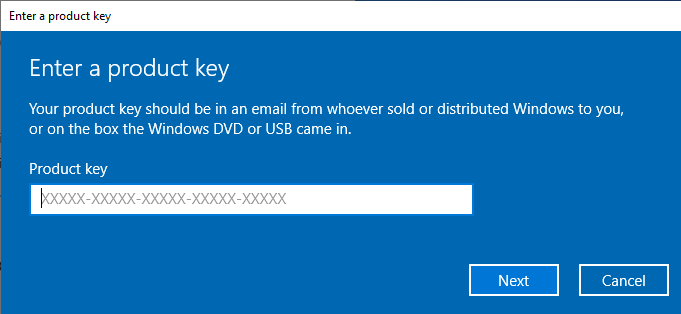
After installing the Operating System. Let’s go and right-click on My Computer and select the properties option and click on the Activate Windows option, then activate and enter the key provided.
INSTALLATION
NOTE: If you are upgrading from Windows 10 Home, you don’t need to download the software. Please use the instructions below to update your computer to Windows 10 Pro.
UPGRADE FROM WINDOWS 10 HOME:
- Deactivate your internet connection for the following process!
- Open the Settings app via the start menu (or the start page in tablet mode) and select the category Update and Security.
- Select Activation and then click the button Change Product Key. Enter the generic Windows 10 Pro key VK7JG-NPHTM-C97JM-9MPGT-3V66T. This key turns Windows 10 Home into Windows 10 Pro.
- After restarting to upgrade to Windows 10 Pro, the operating system is no longer activated.
Then enter the valid Windows 10 Pro key for activation.
In some cases, the update might abort at 100% with an error. If that happens, restart manually and your system will have been upgraded to Windows 10 Pro. You can now activate it using the provided key.
NEW INSTALLATION:
After downloading, burn the ISO file to DVD or save it to USB. Once you boot your PC / Laptop with the DVD / Pendrive the installation program will run. Follow the guided steps of the program to complete its installation.
After installing the Operating System. Let’s go and right-click on My Computer and select the properties option and click on the Activate Windows option, then activate and enter the key provided.
IF THE ONLINE ACTIVATION WAS NOT SUCCESSFUL
Activate your password by phone: to do this, select «Show other activation methods» -> «Next» -> «Automatic during Windows activation. Use the phone system ».
Choose your location and call one of the numbers shown.
- Activation through Microsoft’s central activation center:
- From the UK, please dial: 900 150 889
- Please try 2 or 3 times in case it doesn’t work right away.
- Activation computer does not always recognize input immediately
NOTE
Microsoft has gradually phased out support for some older products. Therefore, telephone activation is no longer possible. If you have any problems or questions during the Installation, please contact our 24/7 customer service.
Other guides
- Installation guide Windows Server 2022 Standard
- Installation guide Office 2010 Professional Plus 32 & 64 Bits
- Installation guide Office 2013 Professional Plus 32 & 64 Bits
- Installation guide Office 2016 Professional Plus 32 & 64 Bits
- Installation guide Office 2016 Standard 32 & 64 Bits
- Installation guide Office 2019 Professional Plus 32 & 64 Bits
- Installation guide Office 2019 Standard 32 & 64 Bits
- Installation guide Office 2021 Standard -32 & 64 Bits
- Installation guide Office 2024 Professional Plus
- Installation guide Office 2024 Standard
- Installation guide Office 2021 Professional Plus
- Installation guide Project 2016 Professional 32 & 64 Bits
- Installation guide Project 2019 Professional 32 & 64 Bits
- Installation guide Project 2021 Professional 32 & 64 Bits
- Installation guide Visio 2016 Professional 32 & 64 Bits
- Installation guide Visio 2019 Professional 32 & 64 Bits
- Installation guide Windows 11 Professional
- Installation guide Windows 7 Professional 32 & 64 Bits